
Translations and I18n
Kvaesitso supports a number of different languages. You can contribute translations in your language using the project's Weblate instance.
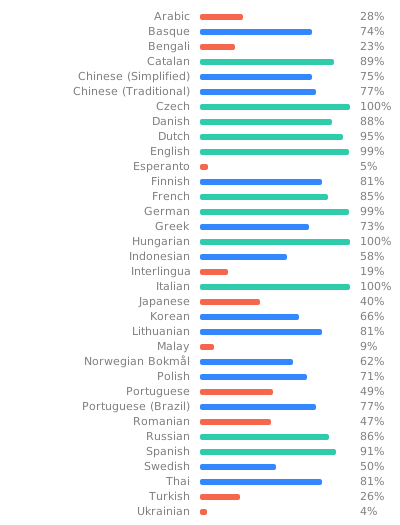
Sign up with your Github account and start translating. If your language does not exist yet, you can create it.
There are two main components in the Launcher category, i18n and units:
i18nis the main component that contains most of the strings that are used within the app.unitsis an extra component that contains all the strings that are used by the unit converter. Each unit has aunit_[name]and aunit_[name]_symbolresource.unit_[name]_symbolis the symbol that is used in the search query. For SI units, this should typically be the SI symbol (m, s, kg and so on), but other, non-SI units may need their symbols to be translated (for example, nautical miles or horse powers).unit_[name]is the full name of the unit that is used in the unit converter results. It's a plural resource, for different quantities of that unit.
There are also some other components that are related to plugin apps, but they are less important, as they are not part of the main app.
Default language variants
- The base language is US American English (
en-US) - Spanish (
es) is LATAM Spanish (es-419) - Portuguese (
pt) is European Portuguese (pt-PT)- For Brazilian Portuguese, see Portuguese (Brazil) (
pt-BR)
- For Brazilian Portuguese, see Portuguese (Brazil) (
- Arabic (
ar) is Modern Standard Arabic - French (
fr) is French (France) (fr-FR) - German (
de) is German (Germany) (de-DE) - Dutch (
nl) is Dutch (Netherlands) (nl-NL) - Swedish (
sv) is Swedish (Sweden) (sv-SE)
Gender-specific variants
In some languages, you need to know the user's gender in order to address them correctly. For example, in French, if you want to tell a user, that they are not logged in, you could say:
Vous n'êtes pas connecté.
But this assumes that the user is male. The correct form to address a female user is:
Vous n'êtes pas connectée.
This is because in French, adjectives need to agree with the subject's gender.
While some languages have developed workarounds for this problem (for example, in French there is the point médian, i.e. "connecté·e"), in others it's simply not possible to write UI texts in a gender-neutral way.
Fortunately, there is a pretty simple solution to this problem: Since Android 14, Android has a Grammar Infliction API. Apps can offer their users an option to pick their preferred form of address, and the system will load a different set of string resources depending to that choice.
Unfortunately, Weblate has pretty poor support for Android's gender-infliction API. The masculine and feminine string variants are simply displayed as separate languages. For example, there is French, French (feminine), and French (masculine).
NOTE
New variants can't be created from within Weblate. Please open an issue if you need new gender specific variants for your language.
The masculine and feminine variants do not need to be completed. They inherit all strings from their base variant. So ignore them until you encounter a string in the base variant that requires a gender-specific variant. When you encounter a string that implies the user's gender, you can press the "Other languages" button and find the gendered variants of your language. Make sure to add a translation in all three variants: one masculine version, one feminine version, and one base version for older Android versions, and for users who prefer a neutral form of address.
Icons and other resources
There are currently no icons that would require localization but in case there were you could simply create a new pull request including the localized resources.
defaults.xml contains (non-string) factory settings for different regions. At the moment this is only used to enable imperial units for US users.